

DKIM authentication required for email channels
Major email providers like Google, Microsoft, and Yahoo have tightened their security. They now require DKIM (DomainKeys Identified Mail) authentication for reliable email delivery. Without it, your outbound emails from Enchant are increasingly likely to land in your customers spam/junk folders.
Enchant now requires DKIM authentication for all emails delivered by our mail servers.
Check the Deliverability section in the Sending/Receiving settings of your email channel. If DKIM is listed in red, then DKIM has not been setup properly.
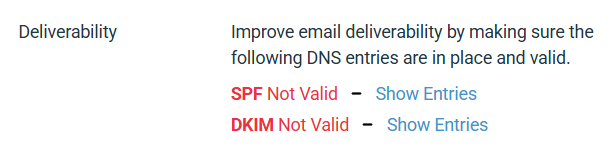
If DKIM is not valid for an email channel, you will need to add the appropriate DKIM DNS records to your domain.
Once the records are in place, Enchant will validate them automatically within a few minutes (i.e. after a refresh, you'll see a green valid instead of red invalid). If it doesn't switch, please reach out so we can verify the configuration changes under the hood.
Note: DKIM DNS records are configured at the domain level. If you have multiple channels sending from the same domain (e.g. support@example.com and sales@example.com), you only need to add the records once for that domain.
If your channel uses a Gmail address, you do not have access to update the DNS records needed to enable DKIM signing through Enchant.
Instead, you must configure the channel to send via Gmail's own SMTP servers using an App Password:
Enable 2-Step Verification on the Google account. You can do this from here (when logged into the account). Google documentation is here.
Once 2-Step Verification is enabled, create an App Password for Enchant. Go here to set it up. Google documentation is here.
Then head Enchant's sending/receiving settings for the channel and the configuration as follows:
Send email: via custom SMTP server
SMTP Host: smtp.gmail.com
SMTP Port: 587
SMTP Username: <your email>
SMTP Password: <app password you generated>
This allows Enchant to deliver email through Gmail's own servers, ensuring reliable delivery without requiring DKIM DNS setup.