

Understanding the campaign lifecycle
A campaign transitions through various states based on your actions, ensuring you have total control over when your audience sees your content.
Here is a step-by-step breakdown of how a campaign moves through its lifecycle.
The 4 Stages of a Campaign:
Draft (The Starting Point) Every new campaign begins its journey as a Draft. This is your sandbox where you can build, test, and refine your strategy without anyone seeing it yet.
Active (Going Live) Once your draft is ready for the world, you can Activate it. This shifts the campaign into an Active state, meaning it is officially live and running.
Paused (The Control Hub) Need to make a quick tweak or take a breather? An active campaign cannot be edited directly; it must first be Paused. While in the Paused state, you have two options:
Reactivate: Resume the campaign exactly where you left off.
Archive: Retire the campaign
Archived (The Final Rest) When a campaign has run its course, you can move it from paused to Archived.
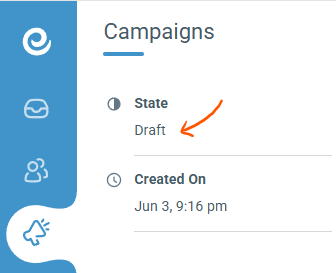
The current state of the campaign is shown in the left sidebar on the Campaign page.
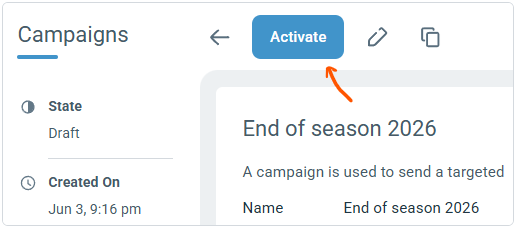
All lifecycle changes can be done from the action bar on top of the campaign page.
Note: You must pause an active campaign before making any changes.
Archiving is permanent. Once a campaign is archived, it cannot be reactivated.
However, a campaign can be cloned. Cloning creates a duplicate of the original campaign's assets and logic, which starts at the beginning of the lifecycle as a Draft.